Help Museums Animate Archive Photos With an Image-to-Video Generator
Valuable evidence of the past people, places, objects, and events is captured in archival photographs. These images are used in […]
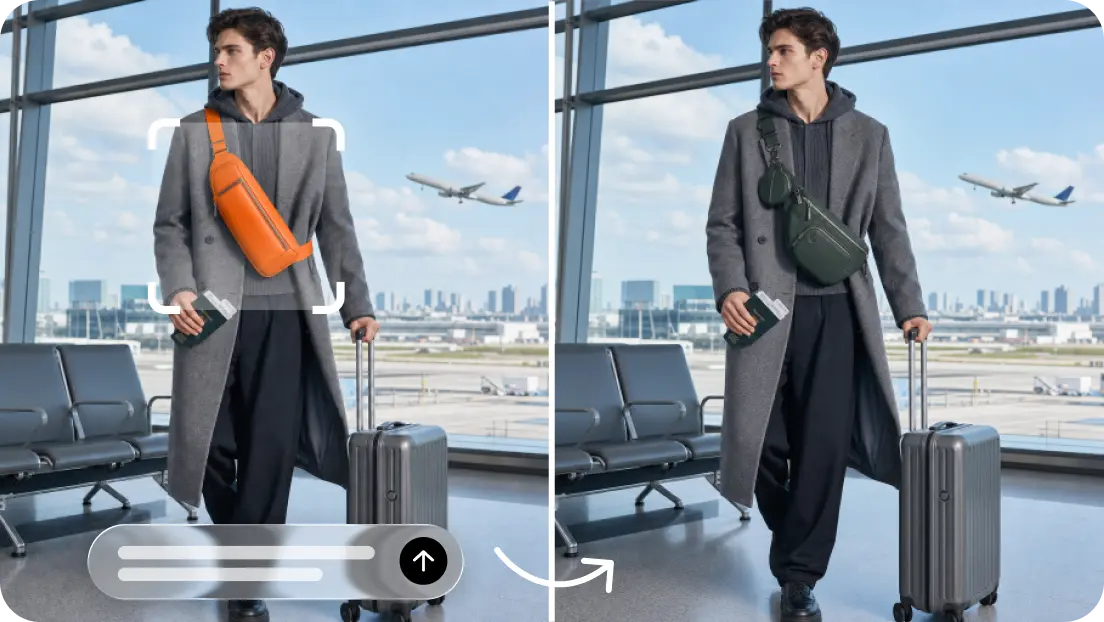
Valuable evidence of the past people, places, objects, and events is captured in archival photographs. These images are used in museums to engage visitors, which aids learning about history. AI video generation can bring to life still photos for engaging exhibition displays and educational resources. Dreamina AI offers tools to create such visual interpretations from reference images.
But created animations need to be monitored. Museums are required to maintain historical accuracy, keep original records, and differentiate between art and documentation.
Define the purpose before animating historical material.
Before implementing Dreamina AI, determine the reasons for animating an archival photograph. Smooth camera motion that leads the audience to architectural features can be helpful in educational interpretation. Motion could be limited to help attract viewers to an exhibit. For social media, shorter video clips that entertain the audience might be more suitable, and for experimental art, some imaginative video cuts with explicit explanations could be used. There are different creative limits and explanations for each purpose. The animate photos with AI should be used to augment the interpretation and not replace historical documentation. Think about the audience, display location, accessibility requirements, and how much time the audience is expected to spend viewing the display. Approval responsibilities should be agreed upon by curators, archivists, educators, rights holders, and communications teams. There are some photos that need to be presented as still images, where the details of what is present are more important than animation.

Protect provenance, context, and the original photographic record.
The first step to historical integrity is reliable documentation. Document the collection, creator (if known), date, catalogue number, and description of each photograph. Always check permissions for reproduction and derivative use before uploading images to Dreamina AI or publishing generated content. Not all proposed uses are necessarily authorized by public availability. Make note of any physical characteristics (fading, scratches, annotations, cropping, etc.) prior to editing. Keep the original archival master separate, and store the created files in a separate location. Check captions, places, names, and historical statements for accuracy against reliable collection information and other scholarship. Clearly mark animations as AI-generated interpretations so that no visitor is misled into thinking that they are original footage. Before uploading sensitive or restricted collection materials, institutions should also review the terms of the platform’s privacy and data-handling policies.
Choose responsible animation approaches for different collections.
Dreamina AI can add movement to the visual; however, it should be applied based on curatorial priorities. Slow camera pushes or pans might help architectural photographs and historical street scenes to show existing detail. With subtle movement in the air, the visual continuity can be achieved without suggesting confirmed weather or unrecorded activity. When creating portrait animation, special care must be taken as generated expressions, gaze, gestures, and clothing details can misrepresent identifiable persons. Object-centred animations can focus on machinery, artifacts, or historic interiors without changing the accepted look of the object. However, there are likely to be distortions in generated models even after careful instructions. Avoid any photos that show movement where it might make it harder to see the damage, change important details, or imply behavior that is not supported. In responsible animation, technology does not take precedence over history.
How to animate museum archive photos with Dreamina’s image-to-video generator
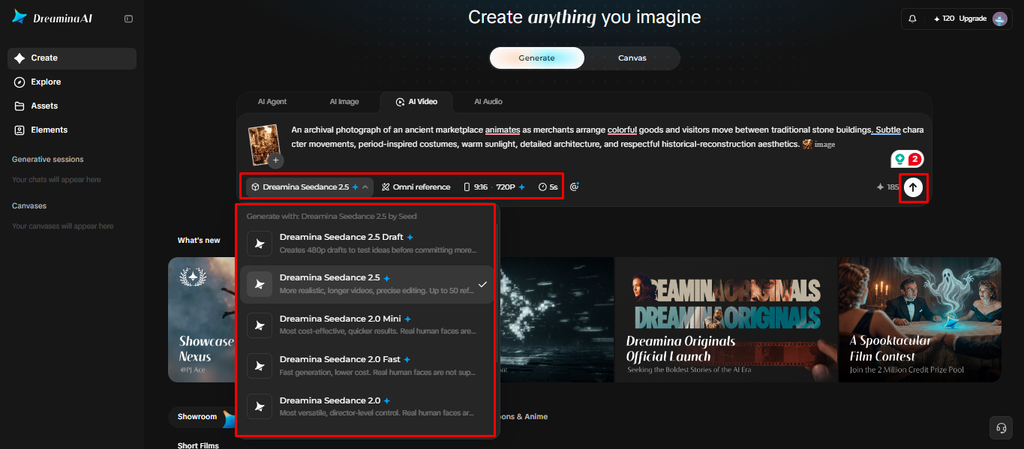
Step 1: Upload your archive photo and write a motion prompt
- Sign up or log in to Dreamina first, then get your archive photo scan ready.
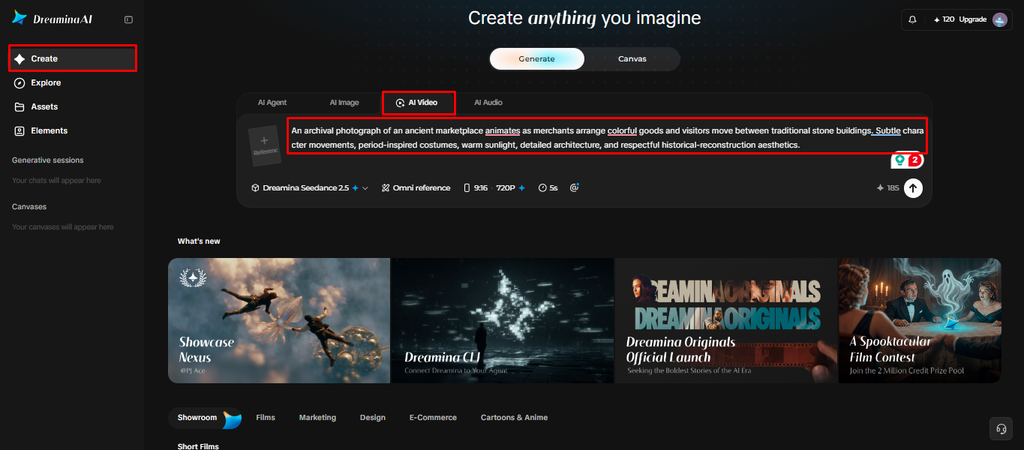
- Go to the “Create” tab from the left menu and select the “AI video” option.
- Enter a detailed text prompt about how you want the era to look and feel. Add details on video elements, theme, and concept, like subtle breathing or gently fluttering flags.
Step 2: Choose a model and generate the animation
- Next, choose a model from the options present at the bottom of the dialogue box.
- The model list features Dreamina Seedance 2.5, Dreamina Seedance 2.0, and Dreamina Seedance 2.0 Fast.
- It also offers Dreamina Seedance 2.0 Mini and Dreamina Seedance 1.0, plus a few more.
- Click on “Omni reference” to guide the AI with multiple reference images from your collection.
- Select a custom aspect ratio and resolution using the “Aspect ratio” and “Resolution” tabs here.
- Finally, click on the “Generate” tab to begin creating your animated archive photograph right now.
Step 3: Refine the footage and export
- If the result looks unnatural, you can “Edit prompt” or “Regenerate” to refine the results.
- You can also edit the generated video using the “Edit video” option for bigger changes.
- Moreover, you can use “Edit segment” to edit only one part of the video clip.
- Use “Extend video” to lengthen your clip so that visitors can absorb each historic moment fully. Apply “Creative upscale” to improve your video quality before you display it in the gallery.
- Dreamina gives you complete freedom to edit your footage the way you like it best.
- Finally, click on the “Download” tab present at the top right corner of the interface. This saves the video file on your local device, ready for exhibit screens and websites.
Write prompts that distinguish visual interpretation from historical claims.
Effective prompts explain what is wanted to be seen and not make up historical actions. For instance, ask for a slow camera move towards a street scene, minimal movement in the atmosphere, and attention to architecture and details of the period. Don’t tell a historical figure to smile, wave, talk, or make a gesture that they didn’t make. Such requests lead to fictional behaviour that viewers may take as historical reality. When institutional policy mandates it, note the prompt, the version of the model used, the date of generation, and any major editorial modifications. Historical accuracy cannot be guaranteed even with the use of precise wording, which can minimize unwanted changes.
Review animations with curatorial and conservation standards.
Check the created clip with the original picture in the sequence. Look for unplanned changes in faces, uniforms, signs, structures, equipment, emblems, or other significant historical elements. Do not hide damage, annotations, or evidence pertinent to interpretation while moving. Check with subject experts for any sensitive events, identifiable persons, and disputed historical accounts. Documented facts and reconstruction of the artwork should be distinguished in the exhibition labels and educational materials. Don’t show dialogue or sound that has been created and called a real historical recording.
Present animated archives accessibly and transparently
Captions, descriptive text, and clear labels for identifying movement made by AI. Provide the original photograph with the animation if possible, so that visitors can examine the historical record for themselves. Add a static alternative if users wish to reduce motion or to take a closer look. Make sure projected displays are readable in intended viewing environments. Be mindful of privacy, consent, and community expectations when animating photographs of identifiable individuals that may be sensitive. Follow institutional policy for the storage of final videos, source images, permissions, prompts, and review notes. These practices promote transparency and responsible collection management.
Conclusion
Dreamina AI can aid museums to develop compelling interpretations of archival photographs without altering the original historical documentation. A responsible workflow includes purpose, rights clearance, documentation of provenance, creation of restrained movement, and informed curatorial review. The labels are clear, and alternatives are easy to find, enabling visitors to understand what the photograph shows and what the animation is reconstructing. When technology enhances engagement while maintaining evidence, context, and public trust, it is historical animation.

Written by Twastia Editorial Team
Twastia Editorial Team shares practical insights about website design, SEO services, Google Ads, content marketing, social media, conversion rate optimization, and digital marketing strategy.
Last updated: Oct 17, 2026
Related posts from Twastia
Explore more useful articles from twastia.com about digital marketing, SEO, websites, ads, content, and growth strategy.