Laser Engraver for Wood: 7 Best Buying Tips
Woodworking has become increasingly digital. Instead of creating every sign, decorative pattern, nameplate, or personalized gift by hand, makers can […]
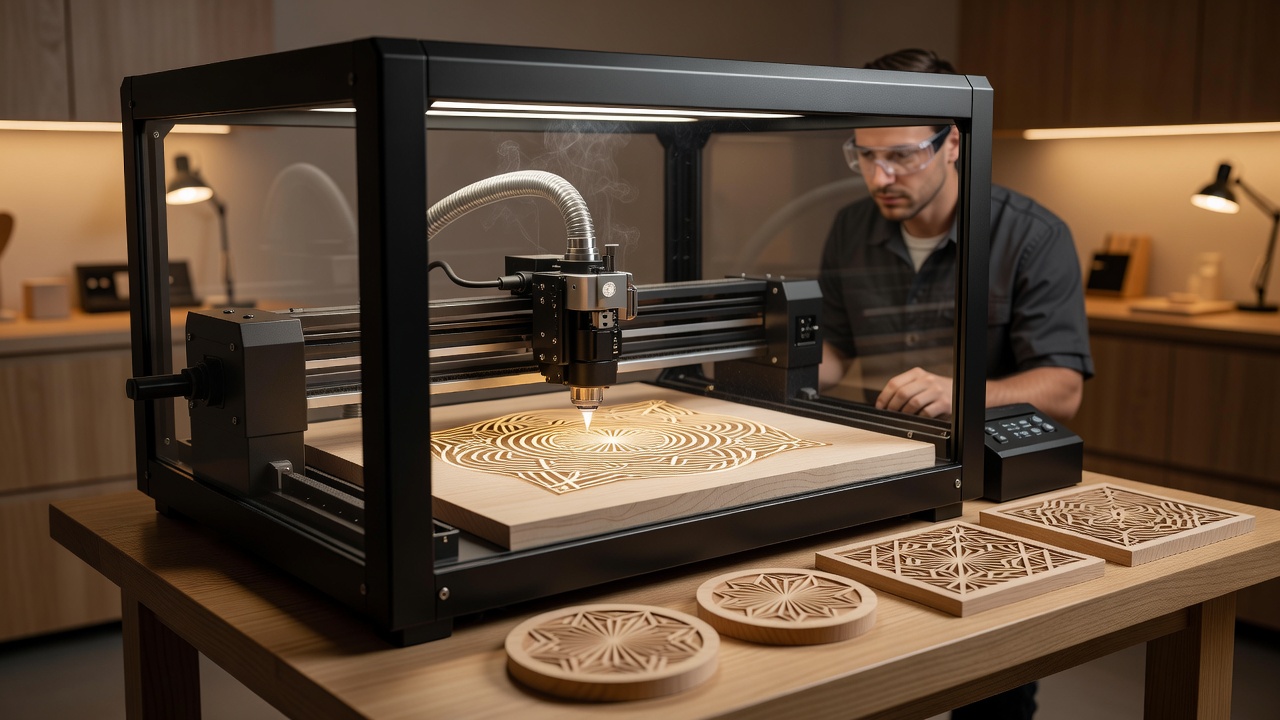
Woodworking has become increasingly digital. Instead of creating every sign, decorative pattern, nameplate, or personalized gift by hand, makers can now reproduce highly detailed designs using computer-controlled laser equipment. A laser engraver for wood can create text, photographs, logos, geometric patterns, artwork, and custom graphics across suitable wooden surfaces, making the technology attractive to hobbyists, professional woodworkers, craft businesses, schools, and personalized-product manufacturers.
Choosing a laser engraver, however, requires more than comparing advertised wattage or maximum working area. Different laser technologies interact with wood differently, and some machines marketed primarily for engraving may not be suitable for cutting thicker material. Smoke extraction, fire safety, enclosure design, software compatibility, focusing, air assist, material consistency, and replacement-part availability can all matter as much as headline laser power.
Wood itself adds another variable. Plywood, solid hardwood, softwood, MDF, veneer, and bamboo do not behave identically under a laser. Glue, resin, moisture, grain, coatings, and surface finishes can affect both appearance and cutting performance. Some materials should never be laser processed because they can produce hazardous gases or create unacceptable fire risks.
This guide covers seven essential considerations for selecting a wood laser engraver, along with practical information on laser types, wood selection, ventilation, project quality, maintenance, and safe operation.
What Is a Laser Engraver for Wood?
A laser engraver for wood is a computer-controlled machine that directs focused laser energy onto a wooden surface to selectively heat and alter the material.
Depending on the machine, settings, and wood, it can perform processes such as:
- Surface engraving.
- Raster images.
- Vector lines.
- Marking.
- Cutting suitable thin materials.
- Personalized lettering.
The laser head follows digital instructions generated through compatible design and control software.
How Does Wood Laser Engraving Work?
Laser engraving uses concentrated energy to heat the wood’s surface.
The resulting color and depth depend on several interacting factors:
- Laser type.
- Optical power.
- Travel speed.
- Focus.
- Number of passes.
- Wood species.
- Grain.
- Moisture.
Rather than using one universal setting, operators normally test combinations until they achieve the desired result for a particular material.
1. Choose the Right Laser Technology
The first major decision when purchasing a laser engraver for wood is the laser source.
Diode Laser
Diode machines are common among hobbyists and small workshops.
Potential advantages include:
- Compact size.
- Relatively accessible pricing.
- Good wood engraving capability.
- Useful desktop formats.
Performance varies considerably depending on the model’s actual optical output and design.
CO2 Laser
CO2 lasers are widely used for organic materials such as wood, acrylic, paper, leather, and certain other non-metal substrates.
They are often chosen for more demanding engraving and cutting workflows.
Compared with many diode systems, they may provide:
- Greater available power.
- Faster production.
- Strong cutting capability.
They can also require more space, cooling, extraction, and maintenance.
Fiber Laser
Fiber lasers are primarily associated with metal marking and are generally not the first choice when wood is the main material.
For a workshop focused on timber products, diode or CO2 technology will usually deserve greater attention.
2. Understand Laser Power
Laser specifications can be confusing because manufacturers may advertise electrical consumption, module ratings, or optical output differently.
When comparing a laser engraver for wood, identify the actual optical power delivered by the laser rather than relying on the largest wattage displayed in marketing material.
Higher usable power can potentially support:
- Faster engraving.
- Deeper engraving.
- Cutting thicker compatible wood.
However, increased power also introduces more heat and greater fire risk.
For fine engraving, precision and control can be just as important as maximum power.
3. Match the Working Area to Your Projects
A machine’s work area determines the maximum project size that can be processed without repositioning the material.
Before buying, list the products you expect to make.
Examples include:
- Coasters.
- Cutting boards.
- Wooden signs.
- Photo panels.
- Boxes.
- Furniture components.
- Ornaments.
A compact machine may handle coasters perfectly while becoming frustrating for large signs.
Larger machines require more workshop space and potentially stronger ventilation.
4. Prioritize Enclosures and Ventilation
Laser engraving wood creates smoke and airborne contaminants.
Proper extraction is therefore essential.
An enclosure can help:
- Contain smoke.
- Support exhaust.
- Control stray laser exposure.
- Reduce workshop contamination.
Ventilation should discharge contaminants appropriately according to manufacturer guidance and local requirements.
Do not operate a smoke-producing laser in an occupied room without suitable extraction simply because the machine is small.
5. Look for Air Assist
Air assist directs a controlled stream of air near the engraving or cutting point.
Depending on the application, it can help:
- Reduce smoke accumulation around the cut.
- Improve cutting quality.
- Reduce localized flaming.
- Keep the lens area cleaner.
It does not eliminate the need for fire monitoring or ventilation.
For people planning to cut wood rather than only engrave its surface, air assist is particularly worth considering.
6. Evaluate Software Compatibility
Hardware is only half of the laser workflow.
The machine must work reliably with software that can convert artwork into movements and laser settings.
Before buying, consider:
- Supported operating systems.
- File formats.
- Design-software workflow.
- Offline operation.
- Camera support.
- Material libraries.
- Updates.
Some machines rely heavily on proprietary cloud platforms, while others support widely used third-party laser-control software.
Choose the ecosystem that matches your technical comfort and business requirements.
7. Make Safety a Core Buying Requirement
A laser engraver for wood combines high-energy light, heat, electricity, moving equipment, and combustible material.
Safety should therefore be considered before performance.
Useful machine safety features may include:
- Appropriate enclosure.
- Interlocks.
- Emergency stop.
- Flame detection.
- Secure laser housing.
- Suitable viewing protection.
Machine classification and requirements differ by product and jurisdiction.
Follow manufacturer guidance and applicable occupational or workshop safety requirements.
Never Leave a Wood Laser Unattended
Wood is combustible.
Laser processing can ignite material, dust, residue, or nearby objects.
Even equipment with flame-detection features should not be assumed incapable of fire.
Keep the working area clear and maintain appropriate fire-safety equipment for the environment.
If the manufacturer requires continuous supervision, follow that requirement strictly.
Best Woods for Laser Engraving
Different woods produce different engraving results.
Maple
Its relatively light color can provide attractive contrast with darker engraving.
Cherry
Cherry can produce warm, rich engraved results.
Birch
Birch and suitable birch plywood are common in laser projects.
Basswood
Basswood is popular for craft projects because it is lightweight and relatively consistent.
Bamboo
Bamboo products can engrave attractively, although technically bamboo is a grass rather than a wood.
Always test a sample before processing an important finished piece.
Plywood and Lasers
Plywood can be excellent for laser projects, but not all plywood performs equally.
Internal glue layers, voids, veneer thickness, and material composition influence cutting.
Laser-specific plywood products are often designed for more consistent results.
Do not assume an unknown sheet is safe or suitable simply because its outer surface looks like ordinary wood.
MDF and Engineered Wood
MDF can be laser processed in some properly controlled applications, but binders and manufacturing composition deserve consideration.
Use only materials whose composition is known and which the machine manufacturer identifies as appropriate.
Adequate extraction becomes especially important with engineered materials.
Materials You Should Not Laser
Never place an unknown material into a laser.
Certain plastics and coatings can release hazardous or corrosive gases when heated.
PVC and vinyl-containing materials are particularly problematic and should not be processed in ordinary laser systems.
Painted, pressure-treated, chemically treated, or coated woods may also contain substances unsuitable for laser processing.
When material composition is uncertain, obtain reliable safety information before engraving it.
Engraving Photos on Wood
Photographic engraving is one of the most visually impressive applications of a wood laser.
The image must usually be converted into a pattern that the laser can reproduce through varying dots, lines, or energy.
Strong results depend on:
- Image contrast.
- Resolution.
- Wood consistency.
- Focus.
- Software processing.
- Engraving settings.
Light, fine-grained woods often provide greater visual contrast than highly irregular grain.
Laser Engraving Text and Logos
Text generally benefits from clean vector artwork.
For business logos, use high-quality original files where available rather than low-resolution screenshots.
Also ensure you have the legal right to reproduce logos, copyrighted artwork, or trademarks.
Owning a laser does not grant intellectual-property rights to commercial designs.
Cutting Wood with a Laser Engraver
Not every engraving machine is an effective cutter.
Cutting performance depends on:
- Laser technology.
- Optical power.
- Wood species.
- Thickness.
- Glue layers.
- Air assist.
- Focus.
Trying to force a low-powered machine through thick wood using excessive passes can cause charring and increase fire risk.
Follow manufacturer-supported material limits.
Focus and Engraving Quality
A laser beam must be focused correctly to achieve predictable detail.
Poor focus can produce:
- Wide lines.
- Reduced contrast.
- Incomplete cuts.
- Excessive charring.
Some machines include automatic focusing, while others require manual adjustment.
Whichever method is used, focus should be checked whenever material thickness or setup changes.
Speed, Power, and Test Grids
Rather than guessing settings, experienced users often create material test grids.
These systematically compare combinations of:
- Speed.
- Power.
- Line spacing.
- Number of passes.
Keep records for commonly used materials.
However, saved settings should still be treated as starting points because wood can vary between sheets and batches.
Smoke Staining and Masking
Wood engraving can leave smoke marks around processed areas.
Possible approaches include:
- Correct extraction.
- Air assist.
- Protective masking where suitable.
- Post-processing.
Masking products should be compatible with laser use and manufacturer recommendations.
Never apply an unknown adhesive material and assume it is safe to burn.
Maintenance
A clean machine is generally more predictable.
Maintenance may involve:
- Cleaning optics according to manufacturer instructions.
- Removing debris.
- Checking belts or motion components.
- Inspecting extraction.
- Cleaning the work bed.
- Reviewing cooling systems on applicable CO2 machines.
Smoke and resin buildup can affect optical performance and create additional hazards.
Follow the equipment’s maintenance schedule.
Laser Engraver for Wood in a Small Business
Personalized wooden products can support businesses selling:
- Wedding décor.
- Signs.
- Gifts.
- Corporate products.
- Home accessories.
- Customized kitchen items.
Before buying equipment commercially, consider:
- Production speed.
- Failure rate.
- Material cost.
- Labor.
- Packaging.
- Ventilation.
- Maintenance.
- Software licensing.
Profitability depends on the complete production workflow rather than the machine’s purchase price alone.
Desktop vs. Production Laser
A hobbyist creating several projects each week has different requirements from a business processing orders daily.
Production environments may prioritize:
- Faster speeds.
- Larger work areas.
- Strong extraction.
- Replaceable components.
- Technical support.
- Repeatability.
Buying the smallest inexpensive machine and then operating it continuously may not be the most economical long-term solution.
Choosing a Seller
Before purchasing a laser engraver for wood, investigate:
- Warranty.
- Technical support.
- Replacement parts.
- Software updates.
- Documentation.
- Safety certifications where relevant.
- Return policy.
A machine with excellent specifications but unavailable replacement optics or electronics can create expensive downtime.
Common Buying Mistakes
Avoid:
- Comparing wattage incorrectly.
- Ignoring ventilation.
- Buying too small a work area.
- Expecting an engraver to cut thick timber.
- Processing unidentified materials.
- Ignoring software compatibility.
- Underestimating fire risk.
Specifications should be interpreted in the context of real projects.
AI and Laser Engraving
Generative AI can help create:
- Decorative patterns.
- Concept artwork.
- Personalized design ideas.
- Initial illustrations.
AI-generated images often require cleanup before engraving.
Designers may need to convert images into vectors, improve contrast, remove unwanted artifacts, or adjust composition.
Commercial users should also understand the licensing and intellectual-property implications of generated content and reference images.
Conclusion
A laser engraver for wood can become an exceptionally versatile tool for personalized gifts, signage, artwork, craft products, prototypes, and small-business manufacturing, but choosing the right machine requires more than comparing maximum wattage. Laser type, actual optical output, work area, air assist, ventilation, enclosure design, software, support, and safety systems all influence real-world usefulness. Material selection matters equally because different woods, plywoods, glues, treatments, and coatings respond differently to laser energy. Buyers should prioritize known materials, proper extraction, continuous fire awareness, and manufacturer-supported operating procedures. With thoughtful equipment selection and disciplined testing, a wood laser can deliver repeatable, detailed results while fitting safely and efficiently into a workshop.
FAQs
What type of laser engraver for wood is best?
Diode and CO2 lasers are commonly used for wood. Diode systems often suit hobbyists and smaller workshops, while CO2 machines may provide greater speed and cutting capability for more demanding production.
How powerful should a laser engraver for wood be?
The appropriate optical power depends on whether you primarily engrave or also intend to cut, along with material thickness and desired production speed. Compare actual optical output rather than ambiguous marketing wattage.
Can a laser engraver cut wood?
Many can cut suitable thin wood, but capability depends on laser type, power, material, thickness, focus, and air assist. Follow the manufacturer’s supported limits.
Which wood gives the best engraving results?
Maple, cherry, birch, basswood, bamboo products, and laser-compatible plywood can produce attractive results. Appearance varies naturally, so sample testing is recommended.
Does a wood laser need ventilation?
Yes. Laser processing wood produces smoke and airborne contaminants. Appropriate enclosure and extraction should be used according to manufacturer guidance and applicable safety requirements.
Is a laser engraver for wood safe to use at home?
It can be used safely only when appropriate safety controls, ventilation, material selection, fire precautions, electrical setup, and manufacturer procedures are followed. A laser processing combustible material should never be treated like an unattended printer.

Written by Twastia Editorial Team
Twastia Editorial Team shares practical insights about website design, SEO services, Google Ads, content marketing, social media, conversion rate optimization, and digital marketing strategy.
Last updated: Aug 10, 2026
Related posts from Twastia
Explore more useful articles from twastia.com about digital marketing, SEO, websites, ads, content, and growth strategy.