How to Create Video Ads With AI: A Practical Guide for Small Businesses
Most small business owners know video works. They scroll past ads every day and can tell a good one from […]
Most small business owners know video works. They scroll past ads every day and can tell a good one from a dull one. The problem is the doing. Filming takes time, editing takes skill, and hiring a production crew for every campaign doesn’t fit most budgets.
That’s the gap AI video tools are filling. You describe what you want, the software builds a draft, and you fix whatever doesn’t feel right. It isn’t magic, and it won’t replace a clear offer or a good message. But it removes a lot of the friction that used to stop smaller teams from making video at all.
This guide covers how AI ad creation works, how to go from a rough idea to a finished video, and how to make sure the ad does its job once it’s live.
Why video ads are worth the effort
Video is where a lot of attention sits. People watch short clips on Instagram, TikTok, Facebook and YouTube every day, and a moving ad usually has a better shot at stopping the scroll than a static image.
Video also lets you show things text can’t. You can demonstrate a product in a few seconds, walk through a service, or give a business some personality without a long paragraph.
The catch is that video has always been the expensive format. Scripts, footage, voiceovers, editing, resizing for different platforms: every step adds time and cost. For a business running on a small marketing budget, that usually meant video got put off for another month, then another.
What AI ad tools actually do
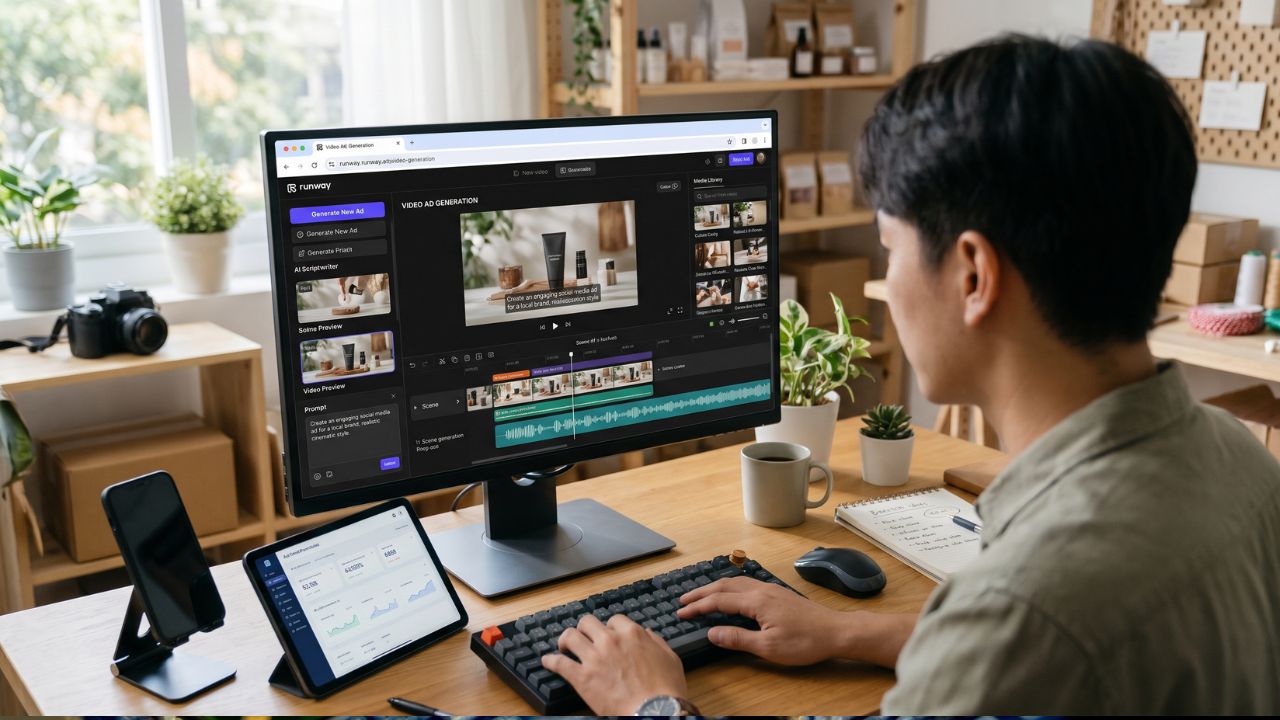
An AI ad tool takes over the slow, repetitive parts of production. Instead of opening editing software and building a timeline scene by scene, you give the tool an idea and it assembles a first version.
In practice, that usually means a few things:
- Script and scene planning. You provide a rough idea or a finished script, and the tool structures it into scenes.
- Visual selection. It picks footage, animations or generated images that match what you wrote.
- Pacing and transitions. It sets timing so the video flows without you adjusting every cut.
- Formatting. It outputs the video in the screen size the platform needs.
You still make the decisions that matter: what the ad says, who it’s for and what you want people to do next. The tool just gets you to a watchable draft faster.
Step by step: making an ad from scratch
The easiest way to understand the process is to walk through it. One tool that covers the whole workflow in a browser is the Renderforest AI ad generator, so the steps below follow how that kind of platform works. The same logic applies to most AI video tools.
1. Start with your idea, script or product link
Everything begins with the brief. You can type a short description of the ad, paste in a script you’ve already written, or start from a product page and let the tool read it. If you’re stuck, many tools offer a prompt to spark an idea or polish what you’ve written.
Spend a few minutes here. A vague brief produces a vague video. “A video about our bakery” gives the AI very little. “A 20-second ad for our sourdough subscription, aimed at busy families, ending with a sign-up offer” gives it something to work with.
2. Pick a visual style
Most tools let you choose how the video looks. Typical options include animated templates, stock footage, AI-generated imagery and image-based slideshows with motion.
Choose the style that fits your brand, not the one that looks flashiest. A law firm and a skate shop shouldn’t sound or look the same. Animated styles suit explainers and software products. Stock or realistic footage tends to work better for services and local businesses that want to feel grounded.
3. Set the video type, language and screen size
Before generating, you’ll choose the format. This is the step people skip and regret.
Pick the screen size for where the ad will run. Vertical suits Stories, Reels and TikTok. Square and landscape work better for feeds and YouTube. Choosing correctly now saves you from awkward cropping later.
If your audience speaks more than one language, this is also where you set the language for text and voiceover.
4. Generate, then edit
Hit generate and you’ll get a full draft. Treat it as a first draft, not a finished ad.
Open it in the editor and look at it the way a stranger would. Does the first two seconds grab attention? Is the message clear without sound? Is anything on screen that doesn’t belong?
Then make it yours. Swap visuals that feel generic, rewrite on-screen text, add your logo and brand colours, and drop in a voiceover or music track. These small edits are what separate an ad that feels templated from one that feels like your business.
5. Export and share
Once you’re happy, download the video or share a link. Many platforms let you export for free to preview, with paid plans needed for higher-quality downloads or watermark-free files, so check what your plan includes before you plan a campaign around it.
Match the ad to the platform
A single video rarely works everywhere. Each platform has its own habits, and ads that respect them perform better.
On YouTube and paid search campaigns, people often arrive with intent. Your ad can be a little longer and more informative. If you’re running Google Ads management alongside video, keep the message consistent between the ad and the landing page so people don’t feel they’ve clicked into something different.
On Instagram, Facebook and TikTok, attention is shorter. Lead with the hook, keep it brisk and make sure it works on mute. Many people watch with the sound off, so on-screen text matters.
On your own website, a video can live on a service page or landing page to explain your offer quickly. It doesn’t need to be as punchy as a social ad.
The nice thing about generating video with AI is that resizing and reformatting is quick. You can make several versions of the same idea for different platforms without starting over.
Using AI video on social media
Social media is where AI-made ads can really earn their keep, mostly because it demands volume. Posting once a month won’t build much momentum. Posting regularly, with fresh creative, will.
That’s difficult when every video means hours of editing. AI tools make it realistic to keep a steady flow of content going: a product highlight one week, a customer-style testimonial script the next, a seasonal offer after that.
If you’re building a content calendar, it helps to treat ads as part of a wider plan rather than one-off posts. Good social media marketing works best when your organic posts, paid ads and brand voice feel like they belong together. Use AI to produce the raw material faster, then use your own judgement to keep the tone consistent.
A few habits help:
- Keep a simple brand checklist: logo, colours, tone of voice.
- Reuse what works. If one hook performs well, try it on a different product.
- Refresh creative before audiences get tired of seeing it.
The ad is only half the job
Here’s something that gets forgotten: a great video can still waste money if the page behind it is weak.
Imagine someone watches your ad, likes it, and clicks through. They land on a slow page with a confusing layout and a contact form buried at the bottom. Most of them will leave. The ad did its job, and the page threw the result away.
That’s why it’s worth looking at conversion rate optimization alongside your ad spend. Small fixes make a difference: a headline that matches the ad, a clear call-to-action button, a shorter form, visible trust signals like reviews or guarantees. When the ad and the page tell the same story, more of the people you paid to reach actually take action.
Common mistakes to avoid
AI makes video easier, which also makes it easier to get things wrong quickly. Watch for these:
Publishing the first draft untouched. Generated videos can feel generic. A few edits for your brand and message go a long way.
Packing in too much. One ad, one idea, one call to action. If you try to say everything, people remember nothing.
Ignoring sound-off viewing. Check that your message works with captions or on-screen text.
Forgetting the audience. An ad for first-time buyers should sound different from one for loyal customers.
Skipping the call to action. Tell people what to do next, whether that’s “book a quote”, “shop now” or “learn more”.
Using the wrong size. A landscape video squeezed into a vertical placement looks sloppy.
Test, learn and improve
The real advantage of fast production is that you can test more. Instead of betting everything on one video, make two or three versions and see which one performs.
Change one thing at a time so you know what made the difference. Try a different opening line, a different visual style, or a different call to action. Watch the numbers that matter for your goal, whether that’s clicks, enquiries or sales, and keep what works.
Over a few weeks, you’ll learn what your audience responds to. That knowledge is worth more than any single video.
Final thoughts
AI hasn’t removed the need for good marketing thinking, but it has removed one of the biggest barriers to video advertising. You no longer need a crew, a big budget or editing experience to put a decent ad in front of your audience.
Start small. Write a clear brief, generate a draft, edit it until it sounds like your business, and pick one platform to test. Pair it with a strong landing page and a bit of patience, and you’ll have a repeatable way to produce ads that actually move the needle.

Written by Twastia Editorial Team
Twastia Editorial Team shares practical insights about website design, SEO services, Google Ads, content marketing, social media, conversion rate optimization, and digital marketing strategy.
Last updated: Nov 6, 2026
Related posts from Twastia
Explore more useful articles from twastia.com about digital marketing, SEO, websites, ads, content, and growth strategy.