AI Sprite Generator: 9 Powerful Ways to Avoid Costly Game-Art Mistakes
An AI Sprite Generator can turn a character concept or reference image into animated frames, directional views and game-ready sprite sheets much […]
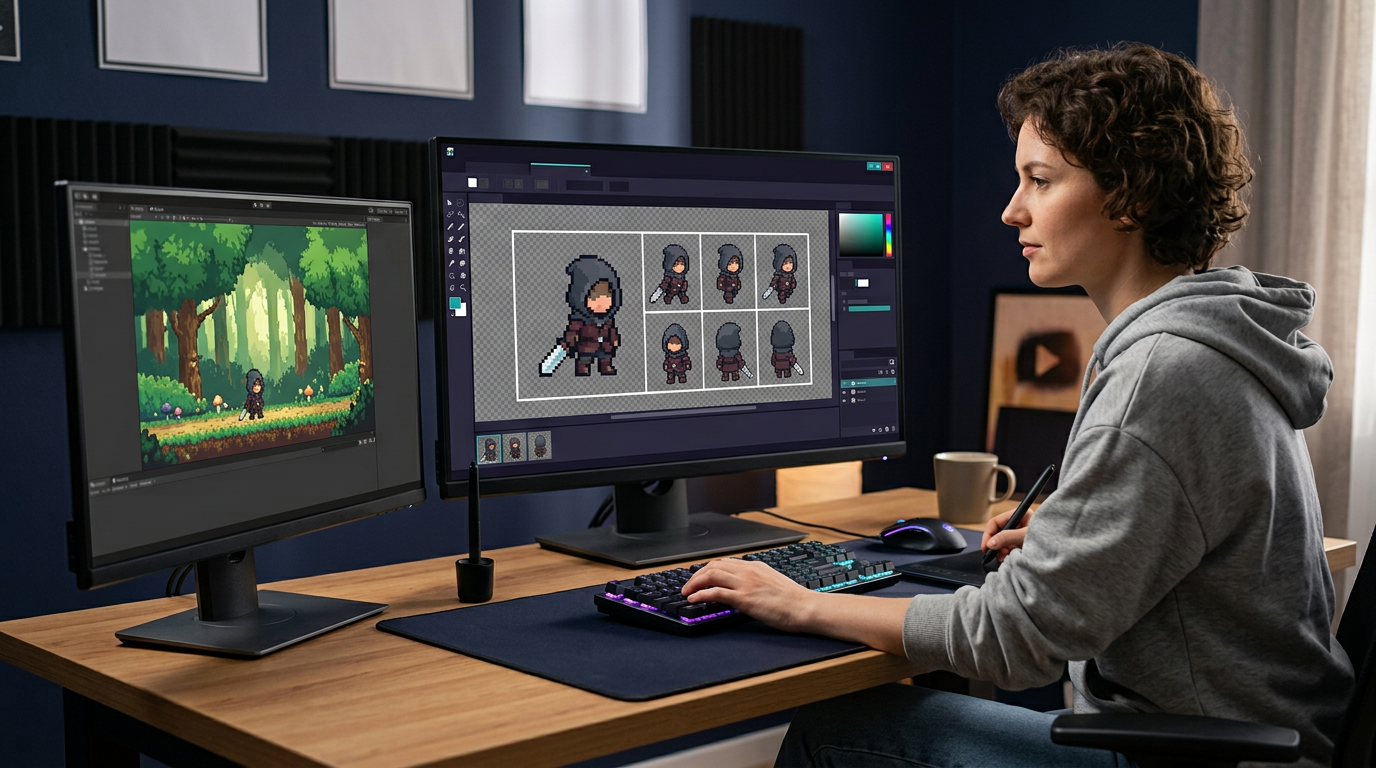
An AI Sprite Generator can turn a character concept or reference image into animated frames, directional views and game-ready sprite sheets much faster than drawing every frame manually. It can help solo developers prototype, expand NPC variety and test visual ideas before committing to final art. However, generated sprites still need direction, cleanup, animation review, technical formatting and rights verification. This guide explains how to build a consistent workflow, write effective prompts, maintain character identity, prepare engine exports and decide when AI output is ready for production.
What Is an AI Sprite Generator?
An AI Sprite Generator is a tool that uses generative models to create two-dimensional game assets. Depending on the platform, it may generate a character from text, animate an uploaded reference, create multiple directional views or export a complete sprite sheet.
Common outputs include:
- Idle animations
- Walk and run cycles
- Attacks
- Jumps
- Damage reactions
- Death animations
- Four- or eight-direction movement
- NPC variations
- Props
- Tiles and map assets
- Transparent PNG frames
- Animated GIF or APNG previews
- Packed sprite sheets
- Metadata for game engines
Traditional sprite production requires concept design, frame planning, drawing, cleanup, timing and export. AI can accelerate several stages, but it does not remove the need for art direction.
An AI Sprite Generator predicts plausible imagery based on prompts and references. It may change a character’s proportions, costume details, weapon hand or colour between frames. Production teams need a review process to catch these inconsistencies.
How an AI Sprite Generator Works
The user typically provides a text prompt, character image or both. The system analyses the reference, generates poses and creates a sequence based on the requested action and frame count.
Some tools use models trained specifically for motion. Others generate key poses and interpolate between them. A platform may also remove backgrounds, align frames, pack an atlas and create metadata.
The output quality depends on:
- Reference-image clarity
- Prompt specificity
- Model and style preset
- Frame count
- Animation complexity
- Character silhouette
- Camera angle
- Direction
- Background removal
- Export settings
An AI Sprite Generator performs best when the character design is readable and the requested movement is physically clear. A simple side-view walk cycle is easier than a spinning attack with flowing clothing, transparent effects and multiple weapons.
9 Ways to Get Better Results From an AI Sprite Generator
A repeatable pipeline is more valuable than one impressive generation. The following practices help turn AI output into usable game assets.
1. Define the Game’s Visual Specification
Before generating characters, document the art direction. Without a specification, each prompt may produce a different visual language.
Define:
- Pixel-art or high-resolution 2D
- Target sprite dimensions
- Camera angle
- Character proportions
- Outline style
- Colour palette
- Light direction
- Shadow treatment
- Detail level
- Animation speed
- Game-engine requirements
An AI Sprite Generator should work within this visual system. “Fantasy pixel art” is too broad to guarantee consistency. Clarify whether the game uses 16-by-16 icons, 32-by-48 characters, painterly side-view sprites or crisp high-resolution cartoons.
Create a reference sheet containing approved characters, props, environments and palette swatches. The sheet becomes the baseline for future generations and quality review.
Do not switch model presets casually after production begins. A small style change can make new characters feel disconnected from earlier assets.
2. Start With a Clean Character Reference
A strong reference image improves identity and costume consistency. Use a clear pose with the full character visible and minimal perspective distortion.
The image should ideally have:
- Plain or transparent background
- Clear silhouette
- Neutral pose
- Visible hands and feet
- Readable costume layers
- Consistent lighting
- No cropping
- No unrelated objects
An AI Sprite Generator may interpret background elements as part of the character. A tree branch can become a weapon, while a strong cast shadow may turn into clothing.
For directional generation, front, side and back reference views can improve consistency when the tool accepts them. Ensure accessories appear in the correct positions across all references.
Use only images you created, licensed or have permission to process. Uploading copyrighted character art without rights can create legal and ethical problems.
3. Write Prompts That Describe Motion and Constraints
A useful prompt describes what the character does, how the camera views the action and which details must remain unchanged.
A structured prompt can include:
Character identity
Compact forest ranger wearing a green hood, brown boots and a short cape.
Action
Looping six-frame walk cycle with natural arm swing.
View
Side view facing right, fixed orthographic camera.
Style
Crisp pixel art with a limited earthy palette and one-pixel dark outline.
Constraints
Keep hood shape, belt pouch and body proportions consistent. Transparent background. No camera movement.
An AI Sprite Generator prompt should avoid conflicting directions such as “highly detailed” and “minimal 16-bit sprite.” Prioritise silhouette and motion at small sizes.
Negative instructions can reduce common errors: no extra limbs, no changing weapon, no shadows outside the frame and no background.
Save successful prompts with model and settings so results can be reproduced.
4. Choose the Right Frame Count
More frames can create smoother movement, but they increase cleanup and memory use. The best count depends on style, action and target platform.
A stylised walk can work with four or six frames. A fluid run may benefit from eight or more. An impact animation can feel stronger with fewer, more distinct poses and deliberate timing.
An AI Sprite Generator may create redundant in-between frames when the count is too high. It may also invent changing details to fill the sequence.
Begin with the minimum count needed to communicate the action. Review key poses:
- Contact
- Down
- Passing
- Up
For attacks, identify anticipation, action, impact and recovery. Good timing matters more than raw frame quantity.
The engine can hold some frames longer than others. A generated sheet with equal frames does not require equal playback timing.
5. Protect Character and Style Consistency
Consistency is one of the hardest challenges in generated animation. Check both visual identity and technical alignment.
Look for changes in:
- Height
- Head size
- Eye position
- Costume layers
- Belt and pockets
- Weapon hand
- Colour values
- Outline thickness
- Light direction
- Foot placement
- Shadow shape
An AI Sprite Generator may create a visually appealing animation that quietly swaps details between frames. These errors become obvious during gameplay.
Use an onion-skin view or stack frames with transparency to compare alignment. Lock a shared palette after generation and correct drifting colours.
For a large roster, maintain a character bible with proportions, palette, equipment and naming conventions. Batch generation should still use the same approved reference and settings.
6. Review Animation at Actual Game Size
A frame can look impressive when enlarged but unreadable at the in-game scale. Always preview the sprite in the intended environment.
Test:
- Silhouette against backgrounds
- Foot contact with the ground
- Animation loop
- Movement speed
- Facing direction
- Readability during combat
- Colour contrast
- Visual effects
- Collision-box relationship
An AI Sprite Generator output may include subpixel movement that causes jitter after the image is snapped to a pixel grid. Pixel-art projects should use nearest-neighbour scaling and integer placement when appropriate.
Watch animations forward and looped. A walk cycle may look acceptable once but jump noticeably when returning to the first frame.
Test in the engine early. A static preview does not reveal sorting, pivots, camera filtering or compression problems.
7. Clean the Output Before Production
AI-generated sprites often need manual correction. Cleanup is not a failure; it is part of the pipeline.
Typical tasks include:
- Removing background remnants
- Fixing extra pixels
- Correcting hands and feet
- Restoring costume details
- Aligning frames
- Normalising canvas size
- Reducing palette
- Repairing outlines
- Adjusting key poses
- Cleaning semi-transparent edges
- Correcting shadows
An AI Sprite Generator may produce antialiased edges that look muddy in pixel art. Decide whether the project uses hard pixels or smooth transparency and enforce one rule.
Use an image editor or pixel-art tool for final passes. Keep original generated frames and edited masters in separate folders.
Do not run the cleaned result repeatedly through generation. Each pass can introduce new inconsistency and make source tracking difficult.
8. Export Correctly for the Game Engine
A correct sprite sheet needs predictable frame order, dimensions, origin and metadata.
Confirm:
- File format
- Alpha transparency
- Colour profile
- Frame width and height
- Padding
- Extrusion
- Frame order
- Animation names
- Pivot point
- Playback rate
- Loop setting
- Collision data
An AI Sprite Generator may export individual PNG files, a packed atlas, GIF, APNG or ZIP. Use PNG or a suitable lossless workflow for engine assets; GIF is often better for preview than production because of colour and transparency limitations.
For Unity, Godot, Unreal or another engine, verify import filtering, compression and pixels-per-unit. Disable smoothing for crisp pixel art when the project requires nearest-neighbour display.
Metadata is useful, but generated collision boxes should be treated as suggestions. Gameplay and physics need designer review.
9. Verify Rights, Privacy and Production Governance
Before using generated sprites commercially, review the tool’s terms. Important questions include:
- Who owns the output?
- Are commercial rights granted?
- Can the provider reuse uploads?
- Are private references used for model training?
- How long are files retained?
- Are generated assets exclusive?
- Are there content restrictions?
- Must AI use be disclosed?
An AI Sprite Generator can create output resembling training patterns or familiar styles. Avoid prompts that request direct imitation of a living artist or copyrighted game franchise. Build an original visual identity instead.
Keep records of prompts, references, settings, licences and edits. Studios may need to prove that source material was authorised and that final assets received human review.
If a client contract prohibits generative AI, do not use it without written approval.
AI Sprite Generator for Pixel Art
Pixel art is not merely low-resolution imagery. It uses intentional pixel placement, controlled palettes, readable clusters and deliberate animation timing.
An AI Sprite Generator can accelerate pixel-art ideation, but generated images may contain:
- Inconsistent pixel sizes
- Uncontrolled antialiasing
- Too many colours
- Noisy single pixels
- Broken clusters
- Uneven outlines
- Subpixel jitter
Set an exact target resolution and palette. Generate near the final size when possible rather than creating a high-resolution image and shrinking it blindly.
After generation, simplify forms manually. At small sizes, one pixel can change an expression or silhouette. Remove detail that does not contribute to gameplay readability.
Use nearest-neighbour scaling for review. Bilinear filtering blurs edges and can hide errors until engine import.
AI Sprite Generator for Eight-Direction Characters
Top-down and isometric games often need north, northeast, east, southeast, south, southwest, west and northwest views.
Directional consistency requires careful handling of asymmetrical details. A sword carried on the right side must remain logically placed as the character turns. A shoulder guard, eye patch or cape clasp should not switch sides accidentally.
An AI Sprite Generator should use a character turnaround or multiple references when supported. Generate cardinal directions first, approve them, then create diagonals.
Check:
- Body rotation
- Weapon orientation
- Foot placement
- Camera elevation
- Head direction
- Light consistency
- Scale
- Shadow angle
Mirroring east and west saves time for symmetrical characters, but it can reverse text, badges and equipment. Use dedicated directional art when asymmetry affects identity or gameplay.
AI Sprite Generator for NPC Variations
Role-playing and simulation games need many non-player characters. AI can generate outfit, hair, age and equipment variations from one approved base.
Variation should not become random noise. Define controlled categories:
- Body type
- Skin tone
- Hair
- Clothing set
- Occupation
- Faction palette
- Equipment tier
- Age range
- Accessories
An AI Sprite Generator batch workflow can combine these categories, but review cultural representation and unintended stereotypes. Random generation should not link occupations, morality or status to protected traits in biased ways.
Maintain silhouette diversity without breaking the game’s visual scale. NPCs should still share outline, palette and lighting rules.
Name and tag generated assets systematically. Hundreds of files become difficult to manage without metadata.
AI Sprite Generator for Combat Animations
Combat animations need gameplay clarity as much as visual appeal. The player should see anticipation, active attack, impact and recovery.
Before generation, define:
- Attack type
- Weapon
- Handedness
- Direction
- Range
- Active frames
- Recovery length
- Root motion
- Hitbox timing
- Visual effects
An AI Sprite Generator can create the pose sequence, but designers must align hitboxes and gameplay events manually. A weapon should not damage enemies before the visible strike reaches them unless that is an intentional mechanic.
Check weapon length and shape across frames. AI frequently bends blades, changes handles or swaps hand positions.
Effects such as fire and motion arcs may be easier to create as separate sprites. Separating effects allows reuse, colour variation and independent timing.
AI Sprite Generator for Props and Environment Assets
Game props include furniture, weapons, containers, plants, machines and interactive objects. They should match character perspective and light direction.
Specify:
- Camera angle
- Scale
- Palette
- Material
- Wear level
- Interaction state
- Transparent background
- Shadow rule
An AI Sprite Generator can create closed, open, damaged and active variants. Review whether state changes preserve the same object identity and dimensions.
For tile-based games, props should align with the grid and leave consistent footprints. Test them against walls, floors and characters before generating a large set.
Do not bake inconsistent shadows into every object if the engine uses dynamic lighting.
AI Sprite Generator for Prototyping vs. Final Art
AI-generated sprites are especially useful for prototypes. They can help teams test character scale, combat timing, UI readability and content scope before final asset production.
Prototype benefits include:
- Faster iteration
- Reduced placeholder inconsistency
- Early engine testing
- Better funding demonstrations
- More realistic level pacing
- Rapid NPC creation
For final art, standards become stricter. Every frame needs identity, clean edges, intentional timing and legal clearance.
An AI Sprite Generator can remain in the production pipeline when the team defines review gates. Some studios use AI for concepts and rough motion, then have artists redraw final frames. Others clean generated assets directly.
The correct approach depends on visual quality, budget, team values, audience expectations and contractual obligations.
Integrating Sprites Into Unity
A typical Unity workflow includes:
- Importing the PNG sprite sheet.
- Setting texture type to Sprite.
- Choosing single or multiple mode.
- Selecting filter and compression settings.
- Slicing frames by grid or metadata.
- Setting pivots.
- Creating animation clips.
- Building an animator controller.
- Adding events and hitboxes.
- Testing in the scene.
An AI Sprite Generator may provide a prepared atlas or metadata, but import settings should still be reviewed.
For pixel art, use consistent pixels-per-unit and camera configuration. Compression can alter edges and palettes. Padding helps prevent texture bleeding in atlases.
Animator transitions should match gameplay state. A perfect walk cycle still looks wrong when the controller restarts it unpredictably.
Integrating Sprites Into Godot
Godot can animate individual frames or sprite sheets through AnimatedSprite2D, Sprite2D with an AnimationPlayer or custom systems.
A practical workflow includes:
- Importing the texture
- Setting filter options
- Creating SpriteFrames
- Adding animations
- Setting playback speed
- Configuring loops
- Assigning pivots
- Adding collision shapes
- Connecting state logic
An AI Sprite Generator export may include frame names and JSON data. Verify compatibility with the project version and import scripts.
Keep collision separate from visible pixels. A character’s cape or weapon may extend beyond the body but should not necessarily enlarge the movement collider.
Test animation under the final camera zoom. Pixel snapping and viewport scaling affect perceived stability.
File Naming and Asset Organisation
A consistent naming convention saves time.
A useful pattern might be:
character_faction_action_direction_variant_frame
Examples:
- ranger_idle_south_base_01
- ranger_walk_east_base_03
- ranger_attack_north_bow_05
Avoid spaces and inconsistent capitalisation if the engine pipeline has restrictions.
Store:
- Source references
- Prompts and settings
- Raw generations
- Cleaned frames
- Packed atlases
- Metadata
- Engine imports
- Licence records
An AI Sprite Generator project should be version controlled where practical. Binary images do not merge like code, so file ownership and naming prevent accidental overwrites.
How to Evaluate AI-Generated Sprite Quality
Review five dimensions.
Identity
Does the character remain recognisable in every frame and direction?
Motion
Does the action have believable weight, timing and loop continuity?
Style
Do palette, outlines, perspective and lighting match the game?
Technical format
Are frames aligned, transparent, named and exported correctly?
Gameplay readability
Can players understand the action at normal speed and scale?
An AI Sprite Generator output should pass all five before production approval. A visually beautiful image that fails engine or gameplay requirements is not game ready.
Common AI Sprite Generator Mistakes
Using vague prompts
Broad descriptions produce inconsistent characters and motion. Define identity, action, view, style and constraints.
Generating too many frames
More frames increase cleanup and may create redundant or unstable details.
Ignoring actual game scale
Sprites must read at the intended resolution, not only in enlarged previews.
Skipping manual cleanup
Background artifacts, extra pixels and changing accessories become obvious during play.
Using copyrighted references without permission
Input rights and output use need review before commercial release.
Mixing presets mid-project
Model changes can break style consistency across the asset library.
Trusting automatic collision boxes
Gameplay collisions require designer testing and adjustment.
Exporting only GIF
GIF is useful for previews but often unsuitable as the production master because of palette and transparency limits.
AI Sprite Generator Pricing and Production Cost
Platforms may charge by subscription, credits, generation, frame count or export type. The visible price does not include human review and cleanup.
Estimate total cost using:
- Generations per approved animation
- Credit cost
- Artist cleanup time
- Engine setup
- Revisions
- Storage
- Commercial licence
- Team seats
An AI Sprite Generator can reduce concept and rough-animation time while still requiring skilled art work. Track acceptance rate: if only one in twenty generations is usable, the effective cost is higher than the credit price suggests.
Run a pilot character through the complete pipeline before committing to a large roster.
Questions to Ask Before Choosing an AI Sprite Generator
- Can it animate an uploaded reference?
- Which styles and resolutions are supported?
- Does it create four- or eight-direction views?
- Can it generate batch NPCs?
- Which export formats are available?
- Is transparent background supported?
- Does it generate metadata?
- Which game engines are supported?
- Who owns commercial output?
- Are private uploads used for training?
- How are credits charged?
- Can projects and prompts be exported?
The best AI Sprite Generator fits the studio’s rights, workflow and technical requirements—not merely the most dramatic demo.
Conclusion
An AI Sprite Generator can accelerate character concepts, animation cycles, directional views, NPC variations and game-prototype assets. Its value comes from reducing repetitive work while giving developers more visual options early in production.
Reliable results require a defined art specification, clean reference images, structured prompts, sensible frame counts and rigorous review at the actual game scale. Generated output should be cleaned, aligned, palette-controlled and tested inside the engine before approval.
Rights and governance matter as much as image quality. Teams should verify commercial terms, protect private reference art and avoid direct imitation of copyrighted franchises or living artists. Used within a controlled pipeline, an AI Sprite Generator can support original game development without replacing the need for human art direction, animation judgement and technical quality control.
FAQs
1. What does an AI Sprite Generator create?
It can generate game characters, animation frames, sprite sheets, directional views, NPC variations, props and engine-ready image exports.
2. Can an AI Sprite Generator make pixel art?
Yes, but output often needs palette reduction, pixel cleanup, frame alignment and nearest-neighbour scaling to meet intentional pixel-art standards.
3. Can AI-generated sprites be used commercially?
That depends on the platform terms, input rights and client agreements. Review ownership, licensing, privacy and training policies before release.
4. How many frames should a walk cycle have?
Four to eight frames work for many styles. Use the fewest frames that communicate motion clearly and match the game’s visual rhythm.
5. Can generated sprite sheets work in Unity or Godot?
Yes, when frame dimensions, transparency, metadata, pivots and import settings are correct. Engine testing and manual configuration are still necessary.
6. Does an AI Sprite Generator replace a game artist?
No. It can speed up concepts and production, but artists are still needed for direction, consistency, cleanup, animation timing and final quality.
Written by Twastia Editorial Team
Twastia Editorial Team shares practical insights about website design, SEO services, Google Ads, content marketing, social media, conversion rate optimization, and digital marketing strategy.
Last updated: Aug 15, 2026
Related posts from Twastia
Explore more useful articles from twastia.com about digital marketing, SEO, websites, ads, content, and growth strategy.